Synchronising Windows CE 1.0x over Infrared with Windows 95 and 98
CESD|200137Applies To
- Windows CE 1.0, 1.01
- H/PC Explorer 1.1
Overview
This article outlines the steps involved with synchronising a Windows CE 1.0 and 1.01 based Handheld PC with the H/PC Explorer Sync client using an Infrared adapter.
The document describes the process required to connect to Windows 95, 98, 98SE. Windows 2000, XP and 2003 are covered in CESD-C-0021. Windows NT 4.0 does not support Infrared connectivity.
More Info
H/PC Explorer and Windows CE 1.0 do not come pre-configured for Infrared communications. In some instances your Windows installation may not be equipped to deal with the Infrared Port on your computer. If this is the case you must ensure that your computer meets a base specification before proceeding.
As there are a large number of variables involved in successfully configuring the Infrared port to synchronise, some steps will not be required on all installations, and there may be additional steps for some configurations.
To attempt to minimise the chances of encountering an unforeseen issue, please ensure that you have done the following & in the order specified before proceeding:
All Configurations
- Ensure that you have a HP Serial IR (HPSIR) compatible IR Adapter
- If your IR adapter is configured through the BIOS, ensure that it is enabled, assigned to a COM port
- If your IR adapter can be configured through the driver or the BIOS we recommend you use Slow IR (IrDA @ 115.2Kbps) and not Fast IR (FIR)
- You understand the protocol and Infrared types outlined in CESD-C-0017
- Ensure that you have the latest drivers for your Infrared Adapter if not automatically installed by Windows
- Place the Infrared COM port on any trusted list in any firewall software application you are running / Disable firewalls applications (disconnect from the Internet first)
- Close any other applications which may attempt to make use of any COM port resource
- Install H/PC Explorer 1.1 - H/PC Explorer 1.0 is not covered by this guide
Windows 95 (RTM/A)
- Windows Socket 2 Update
- Dial Up Networking 1.4
- IrDA 2.0 Infrared Drivers
- Infrared Transfer 1.0
We also recommend that you follow the HPC:Factor Windows 95 Patching and Updates Guide in full. Download links for the above updates can be found in the guide.
Windows 95 (B, OEM SR2.0, 2.1, 2.5)
- Dial Up Networking 1.4
We also recommend that you follow the HPC:Factor Windows 95 Patching and Updates Guide in full. Download links for the above updates can be found in the guide.
Windows 98 (First Edition)
- Dial Up Networking 1.4
We also recommend that you follow the HPC:Factor Windows 98 First Edition Patching and Updates Guide in full. Download links for the above updates can be found in the guide.
Windows 98 (Second Edition)
- Dial Up Networking 1.4
We also recommend that you follow the HPC:Factor Windows 98 Second Edition Patching and Updates Guide in full. Download links for the above updates can be found in the guide.
How-to Guide
Please ensure you have followed through the steps outlined in more information before attempting to continue.
Host PC Configuration
- Click Start
- Select Settings and open the Control Panel
- Double Click the System icon

- Select the Device Manager Tab
- Ensure that you have an adapter listed in the 'Infrared' section (e.g. "Built-in Infrared port on Laptop or Desktop") and that you have an Infrared Serial Communications Port / Virtual Infrared Port listed in the 'Ports (COM & LPT)' section
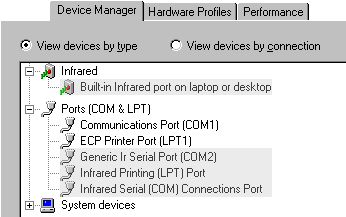
- If either are missing from the list use Add New Hardware from the Control Panel to add your Adapter and reboot your computer
- Return to the Control Panel and double click Infrared

- Select the Options Tab
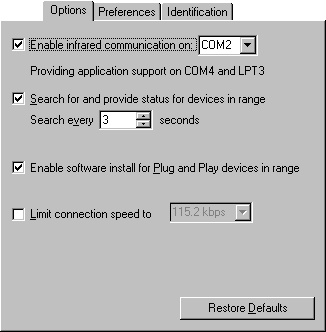
- Tick 'Enable infrared communication on:' and select the Physical port that your Infrared adapter is connected to. Once selected note down the information listed as "Providing application support on COM# and LPT#" where # is the number assigned as your Virtual COM port
- Click on the Identification tab
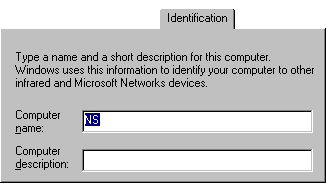
- Ensure that a unique name of less than 15 alphanumeric characters, containing no spaces and no characters other than A-Z, 0-9, - and _ has been entered in the Name box. Click OK to exit
- Open Handheld PC Explorer

- From the File menu, select Communications...
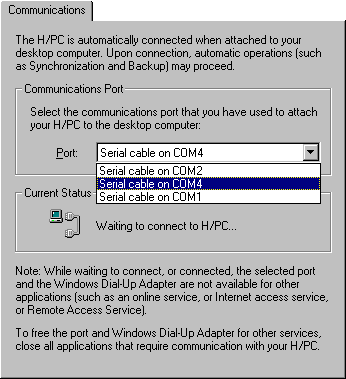
- Expand the Port drop box. If you see the Virtual COM port that you noted down from step 9, select it from the list, click OK and proceed to step 20
- If you do not see the Virtual COM port listed, exit H/PC Explorer completely
- Click Start, Programs, Accessories, Communication and run Direct Cable Connection

- Select Host and click Next
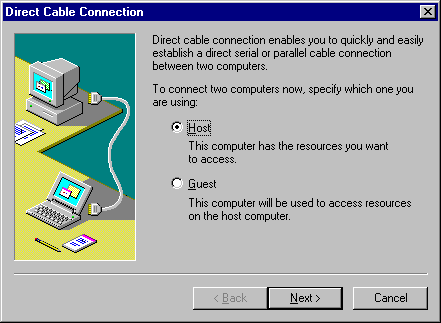
- Click on the Install New Ports button to begin a port scan
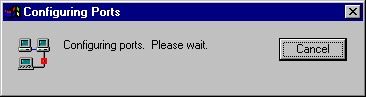
Once complete your Virtual COM port will be added to the list of available ports. Click Cancel
- Restart H/PC Explorer and follow Step 14
- Your Host PC is now ready to synchronise over infrared
Handheld PC Configuration
Your Windows CE 1.0x H/PC, unlike newer versions is not configured to synchronise over Infrared. You must now create the connection manually.
- On your device Click Start, Programs, open Communications and enter Remote Networking
- Double Tap on Make New Connection
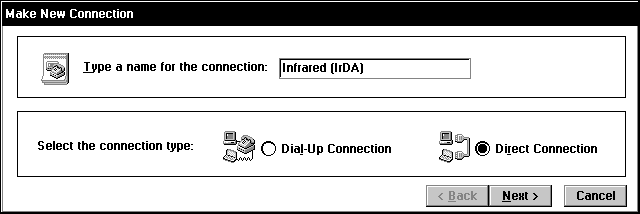
- In the Type a name for the connection enter "Infrared (IrDA)". Ensure that Direct Connection is selected and tap Next
- From the drop box select Infrared Port
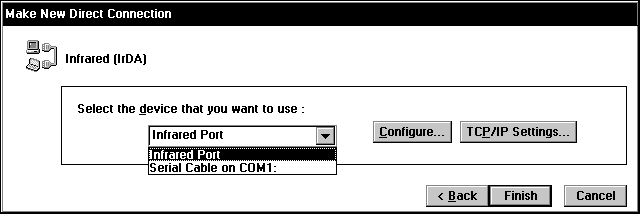
Tap the Configure... button
- In the Baud Rare drop box select 115200 and tap OK
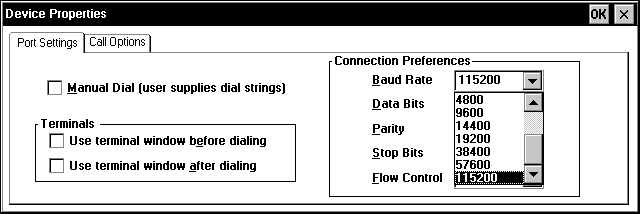
- Click Finish to end the wizard
- Tap Start and select Settings
- Double tap on Communications

- In the Device Name text box enter a unique name for your Handheld PC. See CESD-C-0009 for more information on selecting a Device Name
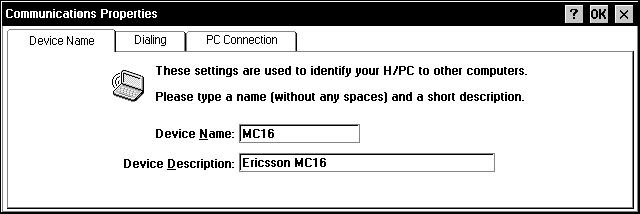
- Tap on the PC Connection tab tap Change...
- From the drop box select the new Infrared (IrDA) connection you created earlier
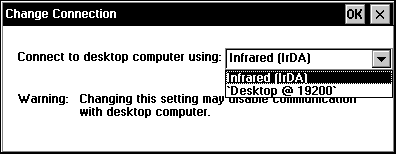
Congratulations you have now configured both your Handheld PC and your Host PC to communicate over Infrared.
To initiate a synchronisation, simply line the Infrared ports up and on the Handheld PC select PC Link from the Communications area in the Start Menu.

See Also
CESD-H-0024 - Troubleshooting Infrared Connections
CESD-C-0017 - Infrared Overview
CESD-C-0021 - Synchronising with H/PC Explorer over Infrared under Windows NT5

