Resetting the 3C589 Series EPROM configuration data
CESD|200119Applies To
- Windows CE 2.0, SP1
- Handheld PC Professional, SP1
- Handheld PC 2000
Overview
As part of our recommended trouble shooting procedure for using the 3Com 589 series Ethernet adapter with Windows CE based Handheld PC's we recommend that users perform a full reset of the EPROM chip setting within the Network Adapter itself. This article explains the process of resetting the adapter.
Downloads
How-to Guide
This guide requires a laptop with a PCMCIA type II slot computer or a PC with a PCMCIA host controller.
- Create a Boot floppy from within Windows
- Download the 3C589 Diagnostic tools from the CESD download centre and extract all of the contents to the floppy
- With the 3C589x adapter in the PCMCIA slot reboot your computer onto the boot disk
- The diagnostics program should automatically start, if it fails to do so type:
3c589cfg and press enter
- From the menu choose Configuration and Diagnostics Program ...
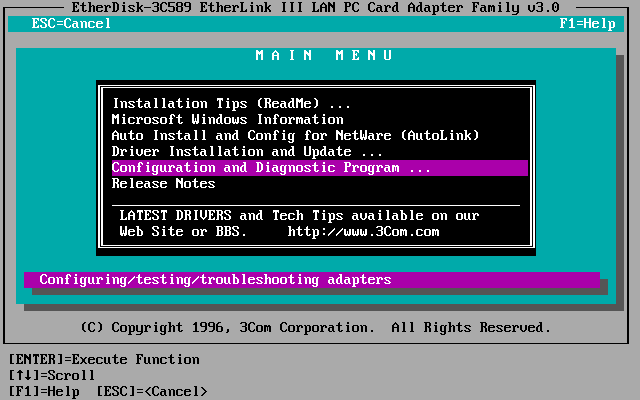
- The program will search for any compatible adapters
- The following error message will be displayed
"Card services is not detected or is not responding.
The diagnostic program will enable the 3c589 adapter using PCMCIA host hardware"
- Press any key
- From the list select Configure Adapter...
- Select AUTO CONFIGURE ADAPTER
- Once complete the default values should have been assigned to the adapter:
I/O Base Address: 300
Interrupt Request Level: 10
Transceiver Type:
<varies on configuration>
Network Driver: Optimisation: Windows or OS/2
Power Save:
<varies on configuration - will not be available for all adapters>
- If the information does not match the above, change the values to the ones listed above. For the Transceiver Type you should select the network connection mode that you use. For most uses this will be TP (Twisted Pair) rather than Coax.
In the event that you are unsure, remove the network cable from your adapter. If the plug on the end of the lead (jack) resembles an oversized version of a modem connector then you should select TP (RJ-45).
- Save the configuration changes
Attempt to use the adapter once again in your Windows CE device.
The Windows CE 2.11 and 3.00 drivers are beta drivers. If you require further assistance we will need the configuration information listed in the diagnostic tools as well as full system information on your Handheld PC. The diagnostic information can be obtained in the 3Com Diagnostics by:
- Boot from the floppy and running the diagnostics
- The diagnostics program should automatically start, if it fails to do so type:
3c589cfg and press enter
- From the menu choose Configuration and Diagnostics Program ...
- The program will search for any compatible adapters
- The following error message will be displayed
"Card services is not detected or is not responding.
The diagnostic program will enable the 3c589 adapter using PCMCIA host hardware"
- Press any key
- Select Show Configuration Information
- Note down ALL the information stored here
- Threads are provided in the HPC:Factor forums for discussing the 3C589x further. Please post your information in full with a description of the steps you have already undertaken.

