| ||
Accessing FTP Sites in Pocket Internet ExplorerCESD|200069Applies To
OverviewA less well known feature of Pocket Internet Explorer is it's ability to access FTP sites. This article describes how to access both secure and non-secure FTP sites using Pocket Internet Explorer 2.0 or above. How-to GuidePocket Internet Explorer supports connections to FTP servers on TCP/IP standard Port # 21. Pocket Internet Explorer acts as an interface to enable you to download from a FTP server. Uploading to a remote FTP server is no supported. Pocket Internet Explorer supports:
Pocket Internet Explorer does not support:
To access a Public FTP Server:
Type FTP:// proceeded by the address of the server that you are trying to access
e.g. if you were trying to access HPC:Factor.com's FTP server then you would type: To access a Private FTP Server:
FTP://<USERNAME>:<PASSWORD>@<URL.suffix>/
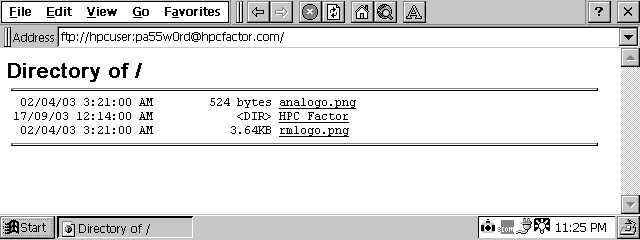
Using Pocket Internet Explorer in FTP Mode:Once logged into a FTP server in Pocket Internet Explorer you will be presented with the server's file list
Pocket Internet Explorer in FTP Mode Navigating around a FTP server under Windows CE is exactly the same as on a Main stream system. The main difference is that files will be organised strictly by file name, irrespective of whether they are files or directories. Unlike in Windows FTP servers do not list Directory's above files. You can treat a FTP resources the same as any ordinary web page viewed in Internet Explorer. Bookmarking FTP resources into the 'Favorites' is just like bookmarking any web site. NB: HPC:Factor does not recommend nor encourage the bookmarking of Private FTP resources as the user name and password is stored with the URL |