| ||
Windows CE VNC 3.3.2 Client cannot connect to VNC 4.0 ServerCESD|200087Applies To
OverviewCurrently Real VNC are in the process of beta testing the release of VNC 4.0. When you try and use the Windows CE VNC 3.3.2 Client you may experience any of the following:
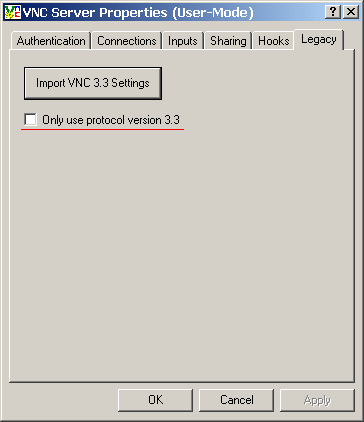
More InfoReal VNC version 4 implements changes to the underlying VNC protocol. New viewers are being posted for a wide range of operating systems. Unfortunately Windows CE's view client has remained on version 3.3.2 and due to inaccuracies in it's implementation of the VNC 3.3 protocol specification is not compatible with the new VNC 4.0 protocol. In order to use the VNC 4.0 server with your Windows CE based Handheld PC you will have to modify the server protocol configuration. Windows SystemsUnder Windows the changes can be made using the VNC configuration application.
Linux SystemsYou will need to modify the command switch parameters specified in your VNC Settings argument. Depending on how you have configured the VNC service this will either be made through the Linux Terminal when you start a xVNC session or in your Boot Service settings file. Please consult your Linux distribution documentation and the RealVNC website for more information on both. Amend the following switch to the xVNC session argument:
NB: Specifying that VNC should only use the 3.3 protocol will disable all VNC 4 enhancements for all client connections from all Operating Systems. See AlsoRealVNC - http://www.realvnc.com/ AcknowledgementsWith thanks to David Feldman for working with us on this article. |