 | ||
Review
Wolfgang Rolke WR-Tools ResInfo 1.33 14 March 2005 Cost: Free Freeware HPC:Factor Rating
Find out more View Wolfgang Rolke WR-Tools ResInfo 1.33 in the Software Compatibility List. Discuss this review Let us know what you thought in the community forums. About The Author Latest Reviews
| Wolfgang Rolke WR-Tools ResInfo 1.33John Ottini | Handheld PC Reviews One of the first things that most Handheld PC owners discover rather quickly, is the importance of good power and memory management when operating their Handheld computers. The second thing they discover is what a poor job the built-in software on their Handheld does in keeping them informed about power and memory management. Waiting for the Low battery warning to show up on your task bar or the Insufficient Memory Error box to pop up on your screen, is a poor way to manage your H/PC. There is also no quick and easy way to find out how much storage memory remains on your Compact Flash card or Secure Digital card! Fortunately, several 3rd party software developers have recognized this weakness and have responded by creating some excellent power/storage management software. one of the best freeware utilities in this category has to be WR-Tools ResInfo by Wolfgang Rolke. What Can ResInfo do for you?ResInfo places two icons in your Taskbar, one showing Battery charge (percentage) and the other showing storage and program memory. Taping on either of these icons will automatically popup the ResInfo software, which consists of 7 information folders. Here is a breakdown of the information available in each folder, some of which I found more useful than others. 
Memory FolderThe memory folder gives you both visual and written information on the amount of Storage and Program memory available on your Handheld PC. Memory consumption and memory availability are shown as exact figures (13mb used - 6792kb free) or as a percentage (66%) of the total allotted memory. For those who prefer a visual representation, horizontal bars with boxes showing memory consumption are also incorporated into the software. Battery FolderResInfo does an excellent job of keep track of the amount of power you have remaining on your battery. The remaining charge is shown in diminishing 10% increments ranging from 100 (full charge) to 10 (big trouble) and visually illustrated with the use of a horizontal bar. One of the functions that I find most useful is how ResInfo keeps track of the amount of time my battery is in use, whether my H/PC is in operation mode or in suspend mode. By studying the behavior of my battery consumption, I usually have a pretty good idea of when I need to recharge my battery, whether I've been using my H/PC frequently or infrequently. 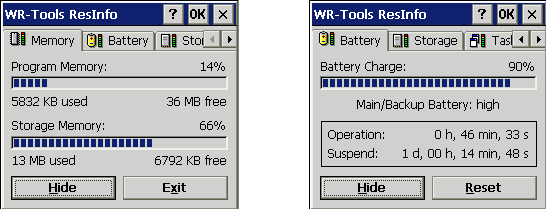
Storage FolderThis is where information about Compact Flash memory, Internal Flash memory (if available) or other secondary storage memory is displayed. Visually and functionally this folder has the same look and feel as the Battery and Memory folders. Tasks FolderShows you a history of the 10 most recently used tasks or processes (executable files). I'm not certain why knowing this would be particularly useful, but it's here if you need this type of information. 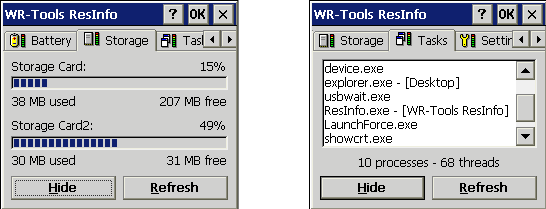
Settings FolderAs the name suggests, this is the folder where options can be toggled on or off. This includes such things as hiding the main window after the software starts, settings alternative tray icon colors, whether to automatically reset runtime, refresh storage times or refresh the task list System Folder and the About FolderGives you some basic information about your Handheld PC (CE version, ram memory, processor type, etc.) and about Resinfo itself (version number, developers website etc.). 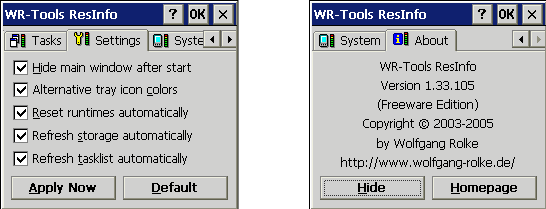
Final ObservationsGenerally speaking, WR Tools ResInfo is fairly easy to use and understand, but if you need clarification on how to use certain functions then Wolfgang Rolke has provided a pretty good set of built-in help menus to assist you. It's difficult to say how good the customer service because I haven't had any problem using this software, so I've had no need to contact the developer. What I can say is that Mr Rolke's website is only in German, which may or may not indicate that communicating with the developer in English maybe a problem. In any event the developer seems to be constantly updating and improving this software, which is a very positive sign in the lackadaisical world of Handheld PC software development. This is high quality freeware at it's very best and something everyone should consider having on your Handheld PC's. The latest version of WR Tools ResInfo is available for download from www.handango.com or www.wolfgang-rolke.de System RequirementsWindows CE 2.0 and above More information on Wolfgang Rolke WR-Tools ResInfo 1.33 can be found at Ratings
Further DiscussionLet us know what you thought of this review and the Wolfgang Rolke WR-Tools ResInfo 1.33 in the Community Forums! |


